Benchmarking Cloudflare Containers vs AWS MicroVMs
We benchmarked cold starts for AWS Lambda MicroVMs and Cloudflare Containers: boot a fresh instance, wait until it answers a real request, record the time, tear it down, repeat. 700 boots across 16 variants.
The result, if latency is what matters to you: use AWS MicroVMs for your sandboxes even if everything else you run is on Cloudflare. In this benchmark, booting a MicroVM from a Cloudflare Worker — cross-cloud, over the public AWS API — was faster and far more predictable than Cloudflare’s own containers on Cloudflare’s own platform. And with Alchemy’s bindings, wiring a MicroVM into a Worker or Durable Object is a few lines of code — we’ll show it below.
We ran opencode as one of the workloads because it’s a popular coding agent that runs as a local process, weighs about 100 MB, and has real startup latency — exactly the kind of thing you’d host in a per-user sandbox. A boot counts as ready when the server answers its health check and creates a real session. Here’s how the distributions compare, opencode and hello world on both platforms:
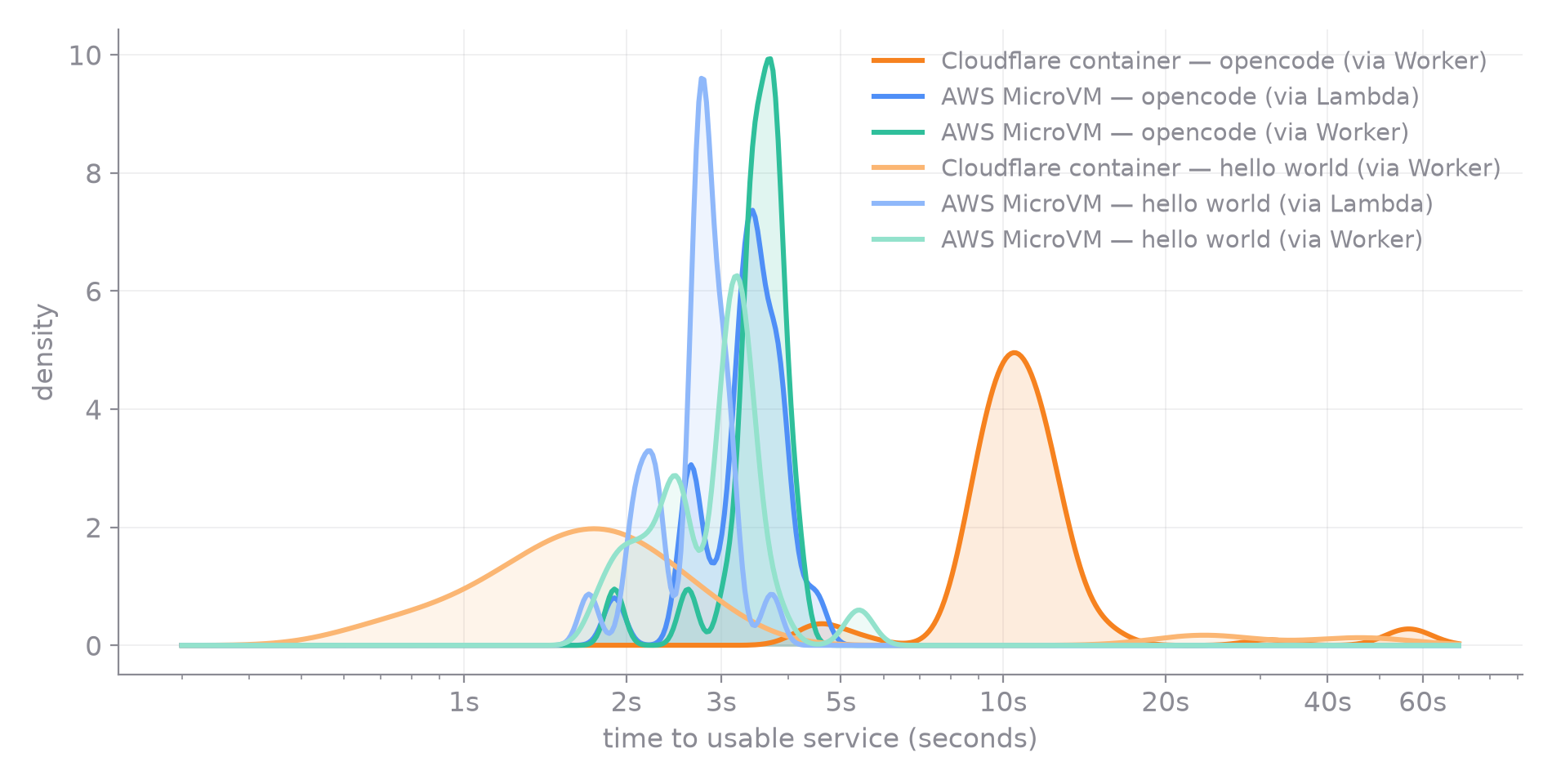
And the same data as individual boots — this view is what the density curves smooth over, the container outliers at 20, 40, nearly 60 seconds:
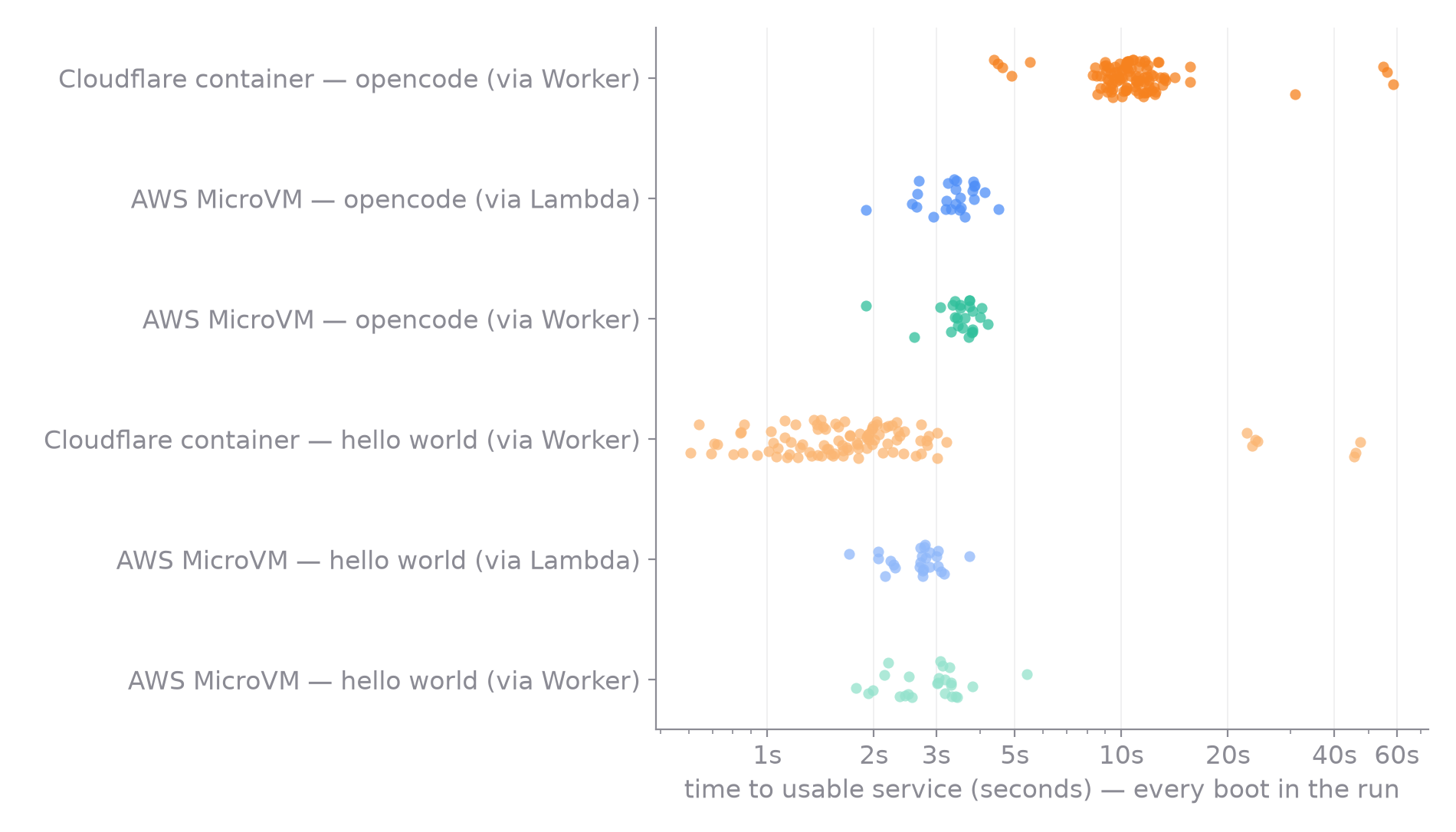
| p50 | p95 | max | |
|---|---|---|---|
| Cloudflare Container — opencode (via Worker) | 10.5s | 15.6s | 58.6s |
| AWS MicroVM — opencode (via Lambda) | 3.4s | 4.1s | 4.5s |
| AWS MicroVM — opencode (via Worker) | 3.6s | 4.0s | 4.2s |
| Cloudflare Container — hello world (via Worker) | 1.7s | 23.9s | 47.3s |
| AWS MicroVM — hello world (via Lambda) | 2.7s | 3.2s | 3.7s |
| AWS MicroVM — hello world (via Worker) | 3.1s | 3.8s | 5.4s |
What’s remarkable in that table is AWS’s consistency. Look at
the two workloads on MicroVMs: hello world is 2.7 seconds at
the median, opencode is 3.4. A 100 MB coding agent with real
startup work costs 0.7 seconds more than a 15-line server —
because on AWS, everything goes through the same path. When
AWS builds a MicroVM image, it doesn’t just build the
Dockerfile — it runs the entrypoint, waits for the
application to initialize, and takes a Firecracker snapshot of
the running memory and disk
(launch post).
Every RunMicrovm resumes from that snapshot, so the workload’s
startup is paid once, at build time. The flip side is that a
lighter image doesn’t boot faster — it goes through the same
snapshot restore. Boot time on AWS is a property of the
platform, not the workload: 2 to 4.5 seconds, whatever’s inside.
Cloudflare is the opposite: boot time is a property of the workload, plus a tail you can’t control. For small, light containers that edge is real — the hello-world container is ready in 1.7 seconds at the median, ahead of anything on AWS. But a container cold start boots the image from scratch and runs the entrypoint, so every single container pays opencode’s full startup: the fastest opencode container in the run took 4.4 seconds and two-thirds took over 10. And the long tail has nothing to do with the workload — the hello-world container shows the same outliers in the scatter plot as the opencode one, with about one boot in ten over 10 seconds and the worst near 50. Yes, a Cloudflare container can be faster; it can also be 30–40 seconds slower, and you can’t predict which you’ll get.
For anything a person actually watches, AWS’s consistency is the better trade. You never want a user staring at a spinner for 10–60 seconds when they could wait 2–4.5, every time. A predictable 3 seconds is something you can design an experience around; an unpredictable 1-to-60 is not. Not one of the 49 successful opencode MicroVM boots exceeded 4.5 seconds.
The “via Worker” MicroVM rows are the proof of the claim at the top: those MicroVMs were booted from a Cloudflare Worker, and they beat Cloudflare’s own containers whenever the workload is heavy enough that startup matters. Crossing clouds costs nothing measurable — how that wiring works is covered below.
The entire opencode image is this:
FROM public.ecr.aws/lambda/microvms:al2023-minimalRUN curl -fsSL https://opencode.ai/install | bashWORKDIR /workspaceENTRYPOINT ["opencode", "serve", "--hostname", "0.0.0.0", "--port", "8080"]The snapshot behavior isn’t configured — it’s what building a MicroVM image means.
The same shape without the workload
Section titled “The same shape without the workload”Strip the workload away and the platforms keep the same
characters. These are the hello-world variants — a 15-line
Bun.serve on both platforms:
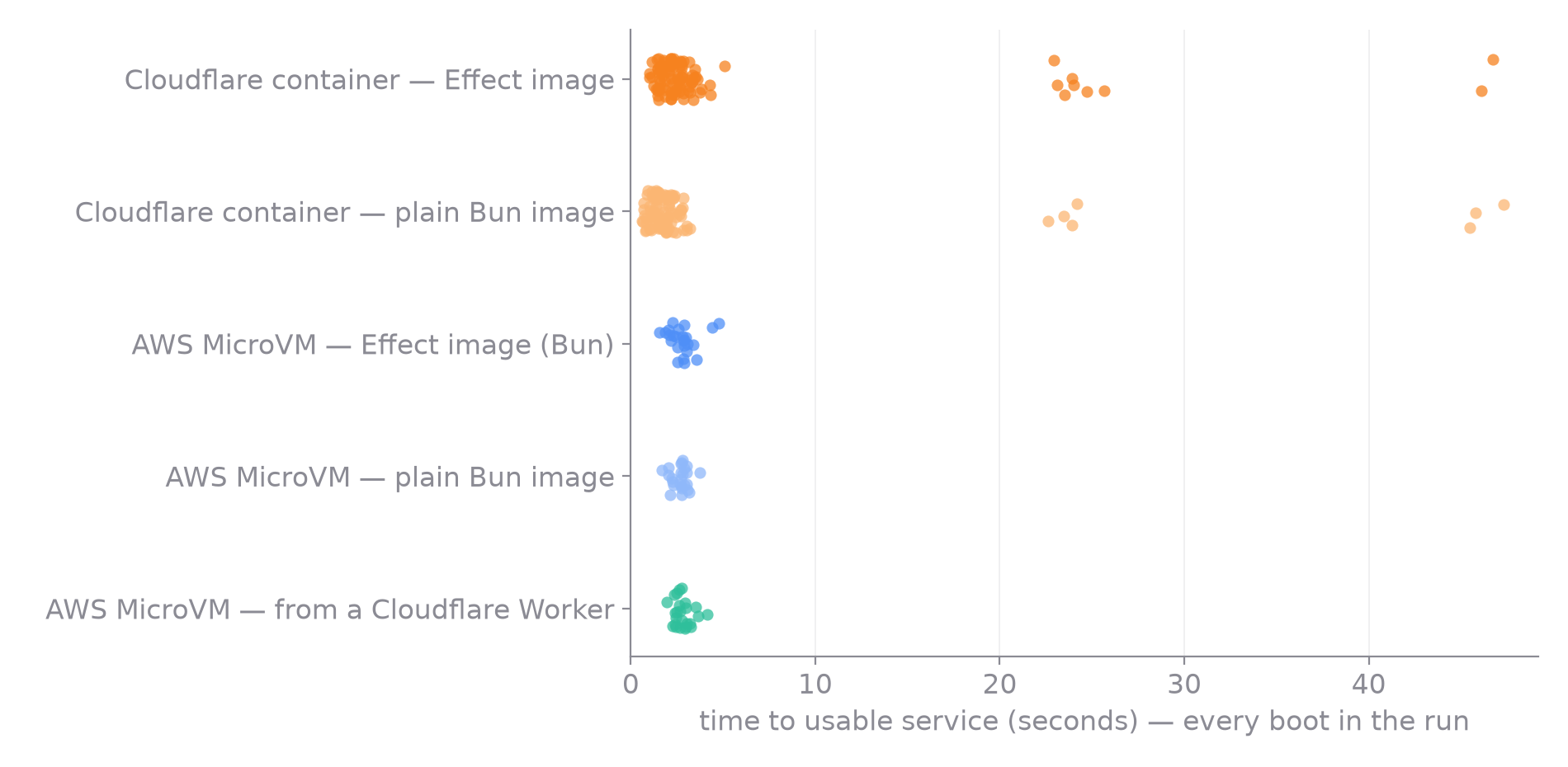
Cloudflare Containers are fast at the median — around 2 seconds — but the samples scatter out to 20, 40, nearly 50 seconds. AWS MicroVMs cluster between 2 and 4 seconds. The distribution view makes the trade explicit:
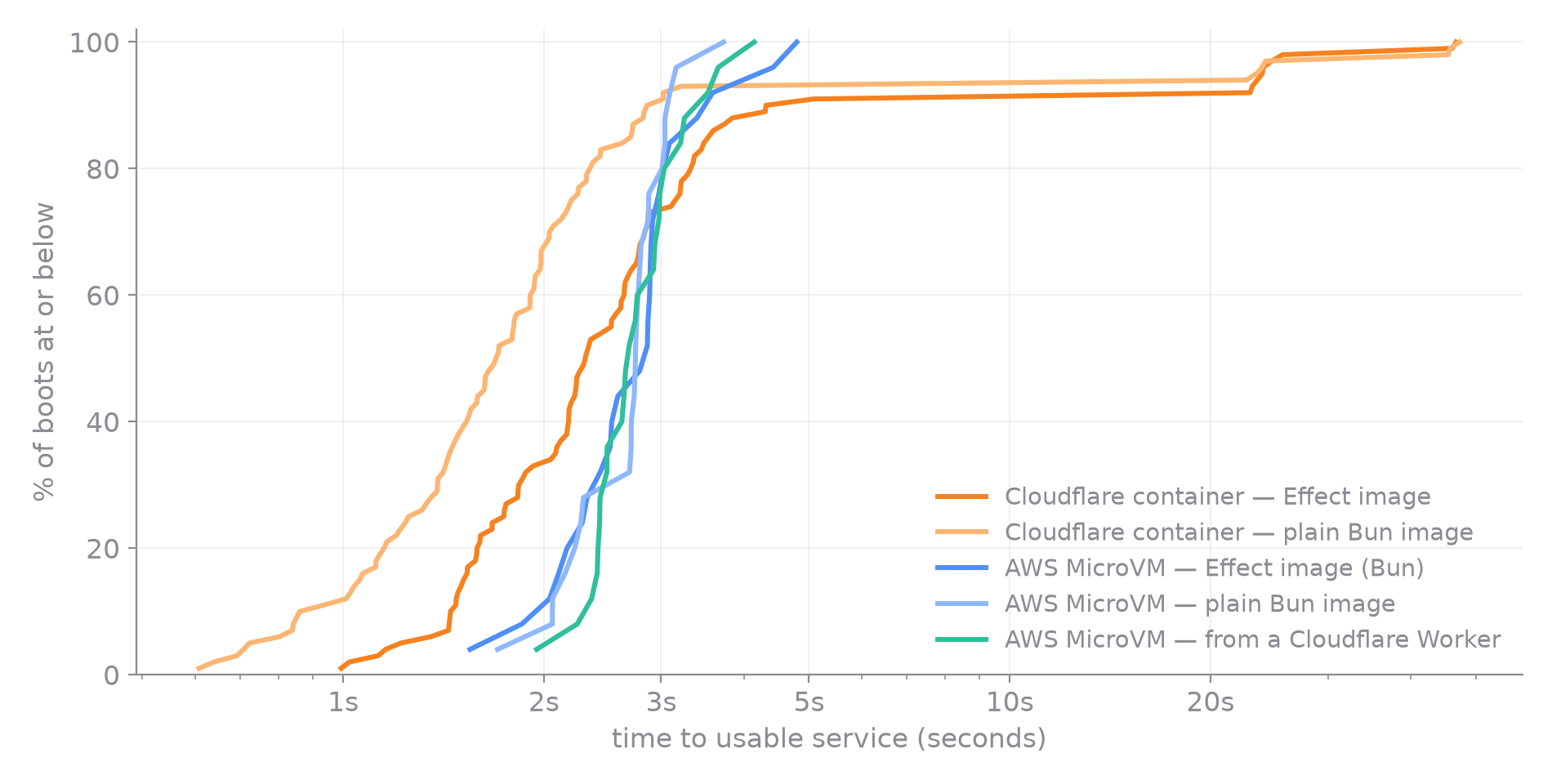
The container curves race ahead early and then go flat. Flat is the problem: 73–90% of boots are done by 3 seconds, and then the curve stalls — the remaining 10–27% of your users are waiting 10, 20, 40+ seconds. Every point in that flat stretch is a person staring at a spinner.
The MicroVM curves are the opposite shape: they start later but go straight up. A vertical line means every boot takes the same amount of time — the median user and the unluckiest user get nearly the same experience. That’s the property you can build a product on: you know what to promise, and the promise holds for the last user as well as the first.
| p50 | p95 | max | |
|---|---|---|---|
| Cloudflare Container (plain Bun image) | 1.7s | 23.9s | 47.3s |
| Cloudflare Container (Effect image) | 2.3s | 24.0s | 46.7s |
| Cloudflare Container (public echo image) | 2.6s | 24.4s | 26.1s |
| AWS MicroVM (plain Bun image) | 2.7s | 3.2s | 3.7s |
| AWS MicroVM (Effect image, Bun) | 2.9s | 4.4s | 4.8s |
| AWS MicroVM (Effect image, Node) | 3.2s | 3.7s | 16.6s |
| AWS MicroVM (booted from a Cloudflare Worker) | 2.7s | 3.7s | 4.1s |
(The full 16-variant matrix — a Python image, the Node baselines, the remaining Worker-driven rows — lives in the full report.)
Which shape you want depends on what you’re building. If a slow boot retries invisibly in the background, take the faster median. If a person is watching — an agent sandbox spinning up, a preview environment, a REPL — the tail is the experience, and you can’t fix it with a spinner.
What we timed
Section titled “What we timed”One metric: time to usable service. Start the clock, ask the
platform for a new instance, and stop the clock at the first
successful application-level response. For the hello-world
variants that’s an RPC round-trip into the running program; for
opencode it’s the health check answering {"healthy":true}
plus a POST /session returning a real session — a write
through the application, proving the resumed process actually
works, not merely that something is listening on the port.
Whatever the platform does in between (pull the image, allocate,
boot the kernel, start or restore the runtime, open the port) is
inside the measurement, because it’s inside the user’s wait.
Every sample is a genuine cold start: each boot uses a fresh instance and the instance is terminated before the next round. One untimed warm-up boot runs first, so the one-time cost of distributing a freshly pushed image isn’t mixed into the numbers.
The images under test
Section titled “The images under test”The benchmark is an ordinary Alchemy app
(benchmark/container).
Each variant is an image resource, and the variants are chosen
to isolate one question each.
The plain-Bun baseline answers “how fast can this platform
possibly boot a JS server?” It’s a Dockerfile and a
15-line Bun.serve script:
FROM public.ecr.aws/lambda/microvms:al2023-minimalRUN curl -fsSL https://bun.sh/install | bashWORKDIR /appCOPY server.js .ENTRYPOINT ["bun", "/app/server.js"]The Effect image answers “what does Alchemy’s abstraction cost on top of that?” Instead of a Dockerfile and a server script, you write an Effect program and Alchemy bundles it into the image — the class is the infrastructure declaration and the typed client:
export class EffectfulBun extends AWS.Lambda.MicrovmImage<  EffectfulBun,  {    hello: (message: string) => Effect.Effect<string>;  }>()("MicrovmEffectfulBun") {}
export default EffectfulBun.make(  { main: import.meta.filename, runtime: "bun" },  Effect.gen(function* () {    return {      fetch: Effect.succeed(HttpServerResponse.text("ok")),      hello: (message) => Effect.succeed(`hello, ${message}!`),    };  }),);
Deploying that builds a MicroVM image whose entrypoint is the
bundled program. Anything that binds EffectfulBun gets
hello as a typed method — the RPC plumbing, auth headers, and
serialization are generated.
The gap between the two rows in the table is the entire cost of that abstraction: 0.2 seconds at the median (2.9s vs 2.7s), and it buys you typed RPC, bindings, and no Dockerfile. We ran the same pair on Node (the MicroVM base image ships with it) and the gap there is a rounding error.
The Cloudflare side mirrors this exactly — a plain oven/bun
container, the same Effect program as a
Cloudflare.Container, and a public echo image pulled from
Docker Hub as a third reference point. Same story on that side
too: the Effect image costs nothing measurable; the tail is a
property of the platform, not the image.
Booting a MicroVM from a Cloudflare Worker
Section titled “Booting a MicroVM from a Cloudflare Worker”This is the part that makes “use AWS MicroVMs from Cloudflare” practical rather than theoretical. Here’s the entire Worker from the benchmark — the binding calls are the same ones a Lambda would make:
export default Cloudflare.Worker(  "MicrovmBenchWorker",  { main: import.meta.filename },  Effect.gen(function* () {    const run = yield* AWS.Lambda.RunMicrovm(EffectfulBun);    const auth = yield* AWS.Lambda.CreateAuthToken(EffectfulBun);    const terminate = yield* AWS.Lambda.TerminateMicrovm(EffectfulBun);
    return {      fetch: Effect.gen(function* () {        const vm = yield* run({});        const { authToken } = yield* auth({          microvmIdentifier: vm.microvmId,          expirationInMinutes: 5,          allowedPorts: [{ port: 8080 }],        });        const sandbox = yield* AWS.Lambda.connectMicrovm(EffectfulBun, {          endpoint: vm.endpoint,          authToken,        });        const greeting = yield* sandbox.hello("bench");        yield* terminate({ microvmIdentifier: vm.microvmId });        return HttpServerResponse.text(greeting);      }),    };  }),);
There’s no AWS account configuration in that file. The binding
detects what it’s attached to. On a Lambda host,
AWS.Lambda.RunMicrovm(EffectfulBun) adds lambda:RunMicrovm
on that image’s ARN to the function’s execution role, and the
runtime uses the assumed IAM Role credentials already available
in the Lambda Function’s environment.
On a Worker host there is no execution role, so the binding builds the bridge itself. At deploy time it creates, once per Worker:
- an IAM User whose only permission is
sts:AssumeRole, - an AccessKey for that user, bound into the Worker as a secret,
- an IAM Role that trusts only that user — and this is the role every MicroVM permission accumulates on.
At runtime the Worker uses the access key for exactly one
operation: AssumeRole. Everything else — RunMicrovm,
CreateAuthToken, TerminateMicrovm — is signed with the
short-lived session credentials that come back. Those are cached
and refreshed near expiry, shared across every binding on the
Worker, so the STS call happens once per isolate rather than
once per request.
Ideally the User wouldn’t exist at all — OIDC federation from the Worker straight into the Role would remove the long-lived key entirely, and that’s where we want to take this. But the shape is already the right one: the static credential can do nothing except mint short-lived ones, and the permissions live on a role scoped to the specific images the Worker binds.
The benchmark says the bridge is free: Worker → MicroVM lands
within noise of Lambda → MicroVM on every variant. An
AssumeRole amortized across boots doesn’t show up.
How the benchmark runs
Section titled “How the benchmark runs”A few methodology details matter more than usual here, because getting them wrong changed our conclusions the first time.
MicroVM boots run one at a time. The MicroVM control plane
is rate-limited per account —
RunMicrovm allows 5 TPS with a burst of 5.
An early version of this benchmark launched 5 at once, sat
exactly on that ceiling, and measured API throttling mixed into
boot time — it looked like MicroVMs had a 1–2 second tail they
don’t have. Each MicroVM sample is now a fully isolated
launch → ready → terminate with nothing else in flight.
Containers have no comparable per-boot limit, so they’re
measured under concurrent load (10 rounds × 10 simultaneous
boots).
This is also why we didn’t compare 100 simultaneous MicroVM launches: the 5 TPS is a soft limit, raised by request. It’s the standard AWS pattern of putting friction on access to a resource rather than a hard capacity ceiling — they’ll bump it when you ask, so it says nothing about how fast the platform boots VMs, only how fast a fresh account is allowed to ask.
The driver measures inside the host. Each host (the Lambda
orchestrator, the Worker) exposes a /boot route that starts
the clock, launches the instance, polls until a real request
succeeds, and reports readyMs. The external driver only
orchestrates; network latency to the driver never contaminates
the measurement. On the container side the clock wraps the
entire Durable Object call — instance allocation, container
start, and the readiness probe — so nothing that happens before
the probe can leak out of the measurement.
Resources are matched or tilted against the winner. The
opencode container runs on Cloudflare’s standard-1 instance
type (4 GiB) against the MicroVM’s 1 GiB, so the gap isn’t
resource starvation — it’s the snapshot.
Everything is written down. Every boot lands as a row in a
CSV, and the summary table and plots are generated from it. The
app, the driver, and the data are in the repo — change a
variant, run bun bench, and see for yourself.
Where this lands
Section titled “Where this lands”Cloudflare Containers win the median for tiny images. AWS MicroVMs win everything else: the worst case by an order of magnitude, and the median too once the workload is heavy enough that startup matters. For anything where a person watches the boot — an agent sandbox, a preview environment, a REPL — the consistency is the feature. A user who always waits 3 seconds is happy; a user who sometimes waits 45 is gone.
One real advantage on Cloudflare’s side that latency numbers don’t capture: the Durable Object sits in front of all of the container’s network traffic. Your JavaScript can intercept every HTTP request the container makes — effectively a man-in-the-middle proxy you control. That enables patterns MicroVMs can’t do natively: keep API credentials in the Worker and inject them into outbound requests, so the agent running inside the container never sees a key it could leak. If your sandbox runs untrusted or agent-generated code against credentialed APIs, that interception layer is a serious reason to choose Cloudflare Containers despite the boot-time tail.
Both platforms sit behind the same abstraction: the same Effect program deploys as a Cloudflare Container or an AWS MicroVM, the same binding call works from a Lambda or a Worker, and the cross-cloud IAM wiring is generated from the code that uses it. Picking the latency shape you want is a couple of lines.